
High quality vector art files are essential for professional printing, branding, embroidery digitizing, packaging, and promotional products. Vector graphics provide scalability, cleaner edges, and better production flexibility compared to raster images.
However, many businesses and designers still make mistakes when using vector artwork. Even professionally created vector files can produce poor results if they are handled incorrectly during production or editing.
These mistakes can lead to blurry printing, incorrect colors, embroidery problems, delayed production, and inconsistent branding.
This guide explains five common mistakes businesses should avoid when using high quality vector art files in 2026.
What Are Vector Art Files?
Vector art files are graphics created using mathematical paths instead of pixels. Unlike raster images, vector graphics can be resized without losing quality.
Common vector file formats include:
- AI
- EPS
- SVG
- CDR
These files are widely used in:
- Screen printing
- Embroidery digitizing
- Logo design
- Packaging
- Large format printing
- Vinyl cutting
Professional vector files help maintain clean and consistent artwork across multiple applications.
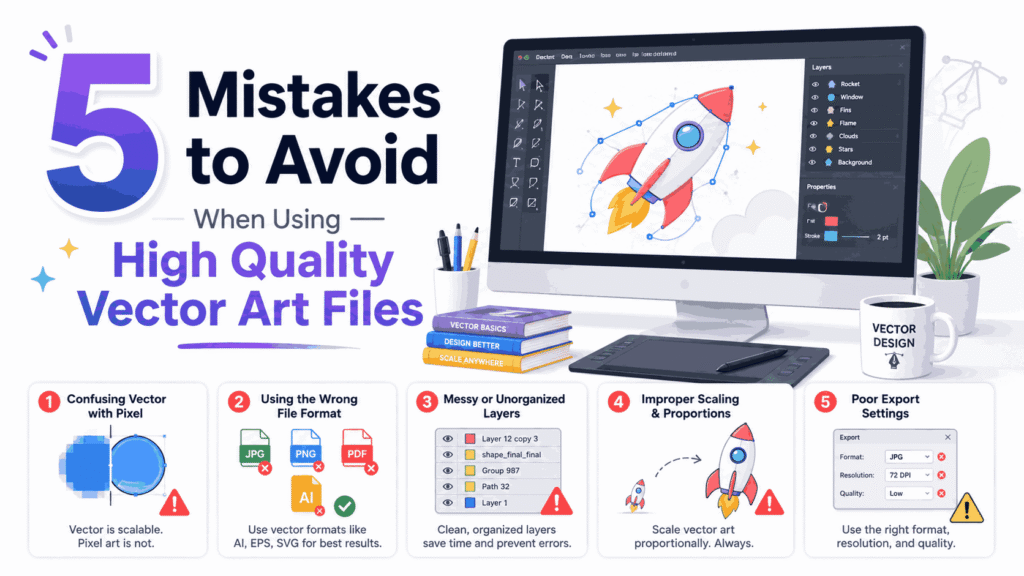
Mistake 1: Using the Wrong File Format
One of the most common mistakes is choosing the wrong vector file format for a specific production process.
Different industries and machines often require different file types.
For example:
- SVG files work well for web graphics and cutting machines
- AI and EPS files are preferred for professional printing
- PDF files are commonly used for sharing artwork
- CDR files are often used in CorelDRAW workflows
Using the wrong format may create compatibility issues, missing fonts, or altered artwork during production.
How to Avoid This Mistake
Always confirm the preferred file format with your printer, embroidery digitizer, or production company before sending artwork.
Keeping editable source files also helps simplify future revisions.
Mistake 2: Ignoring Color Mode Requirements
Color problems are extremely common in production workflows.
Many businesses design artwork in RGB color mode for screens but forget that commercial printing often uses CMYK or Pantone colors.
This can lead to major color differences between digital previews and printed products.
For example:
- Bright screen colors may print duller
- Brand colors may shift during production
- Color consistency may vary across products
How to Avoid This Mistake
Use the correct color mode based on the project type.
RGB
Best for websites, social media, and digital displays.
CMYK
Preferred for commercial printing.
Pantone Colors
Used for accurate brand color consistency in professional production.
Always communicate color requirements clearly before printing begins.
Mistake 3: Editing Vector Files Incorrectly
Some users accidentally damage vector artwork during editing.
Common editing mistakes include:
- Flattening layers unnecessarily
- Expanding editable text too early
- Deleting linked elements
- Breaking path structures
- Overcomplicating anchor points
Improper editing can reduce flexibility and create production errors later.
How to Avoid This Mistake
Keep a master editable version of the artwork before making changes.
Professional designers also organize layers properly to simplify future editing and production adjustments.
Mistake 4: Assuming All Vector Files Are High Quality
Not all vector files are professionally created.
Some files are generated using automatic image tracing software, which can create:
- Jagged curves
- Rough outlines
- Excessive anchor points
- Uneven shapes
- Distorted lettering
Even though these files are technically vectors, they may still perform poorly during printing or embroidery.
How to Avoid This Mistake
Check the vector artwork carefully before production.
Professional vector files usually contain:
- Smooth curves
- Clean edges
- Organized layers
- Balanced anchor points
- Accurate proportions
Whenever possible, use manually recreated vector artwork instead of automatic tracing.
Mistake 5: Using One File for Every Production Type
Many businesses assume a single vector file will work perfectly for every application.
In reality, different production methods may require different artwork adjustments.
For example:
- Embroidery requires simplified details
- Screen printing may need color separations
- Large banners require scaling adjustments
- Vinyl cutting requires clean closed paths
Using one unchanged file for every process can create production quality issues.
How to Avoid This Mistake
Prepare artwork versions based on production needs.
Professional designers and vector artists often create separate files optimized for:
- Printing
- Embroidery digitizing
- Web graphics
- Packaging
- Large format production
This improves consistency and production efficiency.
Why High Quality Vector Files Matter for Businesses
Professional vector artwork improves more than just design quality. It also affects branding, customer trust, and production accuracy.
Businesses using high quality vector files benefit from:
- Cleaner printing
- Better embroidery digitizing
- More consistent branding
- Easier editing
- Faster production workflows
Sharp and professional artwork improves how customers view a brand.
How Vector Files Support Embroidery Digitizing
Embroidery digitizers rely heavily on clean vector artwork.
High quality vector files help digitizers:
- Identify clear stitch areas
- Maintain accurate logo proportions
- Improve lettering quality
- Reduce setup time
Poor artwork often requires additional cleanup before digitizing can begin.
Importance of Professional Vector Conversion Services
Many businesses only have low-resolution logos or screenshots available.
Professional vector conversion services manually recreate artwork into scalable vector graphics suitable for production.
This improves:
- Print quality
- Scalability
- Editing flexibility
- Branding consistency
Manual recreation typically produces better results than automatic tracing software.
Future of Vector Artwork in 2026
As ecommerce, print-on-demand, and digital branding continue expanding, businesses increasingly rely on professional vector artwork.
Modern workflows now require vector graphics for:
- Apparel branding
- Packaging design
- Embroidery digitizing
- Social media assets
- Marketing campaigns
- Large format advertising
Clean and scalable artwork remains one of the most valuable assets for professional branding.
Conclusion
Using high quality vector art files correctly is essential for successful branding, printing, and production workflows. Even strong artwork can create problems if businesses ignore file formats, color modes, editing practices, or production requirements.
Avoiding these common mistakes helps improve consistency, reduce production errors, and maintain professional visual quality across all products and marketing materials.
Businesses that invest in professionally created vector artwork and proper production preparation achieve better long-term branding results and smoother workflow efficiency.
FAQs
What is a vector art file?
A vector art file is a scalable graphic created using mathematical paths instead of pixels.
Why are vector files important for printing?
Vector files maintain sharp quality at any size and improve production accuracy.
Can poor vector files affect embroidery digitizing?
Yes. Rough or poorly structured vector files can create digitizing problems and reduce embroidery quality.
What is the best vector file format for printing?
AI and EPS are among the most commonly preferred formats for professional printing.
Why is CMYK important for printing?
CMYK color mode is optimized for commercial printing and helps improve color accuracy.
Should businesses keep editable vector files?
Yes. Editable files allow easier revisions, resizing, and future production adjustments.